


Documentation
The following documentation is available online at support.dell.com/manuals:
Dell™ PowerVault™ MD Storage Arrays Support Matrix
Dell™ PowerVault™ MD Storage Arrays Getting Started Guide
Dell™ PowerVault™ MD Storage Arrays Deployment Guide
Dell™ PowerVault™ MD Storage Arrays Owner's Manual
Dell™ PowerVault™ Modular Disk Storage Arrays CLI Guide
Dell™ PowerVault™ Modular Disk Storage Arrays SMI-S Provider Installation Guide
Dell™ PowerVault™ MD Storage Arrays Getting Started Guide
Dell™ PowerVault™ MD Storage Arrays Deployment Guide
Dell™ PowerVault™ MD Storage Arrays Owner's Manual
Dell™ PowerVault™ Modular Disk Storage Arrays CLI Guide
Dell™ PowerVault™ Modular Disk Storage Arrays SMI-S Provider Installation Guide
Accessing Documentation
The documentation for your MD Storage Array may be accessed via Service Tag or by manually choosing the product model from support.dell.com. Dell recommends using the Service Tag to access documentation.
Using the Service Tag to Access Documentation
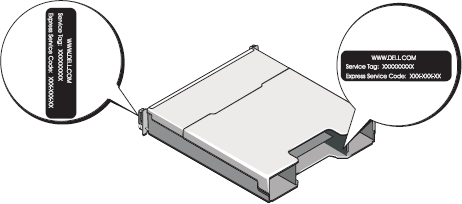
Your system is identified by a unique Express Service Code and a Service Tag number. The Express Service Code and Service Tag are located at the front and back of the system (next to the RAID controller modules).
-
To locate your Service Tag:
The Service Tag number and the Express Service Code are shown in the following figures. Write down and store this information in a safe place.
- Go to support.dell.com/manuals.
- Choose Enter a Tag.
- Enter your Service Tag.
Using the Product Model to Access Documentation
If you do not have your Service Tag available:
- Go to support.dell.com/manuals.
- Choose Select Model -> Servers, Storage, Networking -> PowerVault Storage.
- Scroll down the list to locate your product.