 Administration > CMDB Administration > View Manager Administration > Working with View Manager > Presentation Options for Views > Grouping Options (Pattern Views Only)
Grouping Options (Pattern Views Only)
Grouping options organize the CIs in a pattern view according to certain criteria, for example, by CIT or by a particular attribute. You define grouping options for a pattern view when creating or editing the TQL for the view, as described in Grouping CIs.
You define the grouping options per node, so that all CIs that relate to that node are organized according to those grouping options. After defining grouping options for a node in the TQL, the view organization changes to display the relevant CIs under the group containers.
For example: A grouping option is defined for TQL node Application, so that it will be grouped by attribute Country:
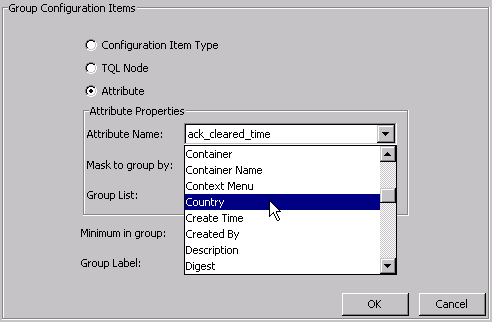
As a result of this definition, all Application CIs included in the view (because they correspond to the Application TQL node) are organized into groups, according to the country defined for each Application CI in its properties.
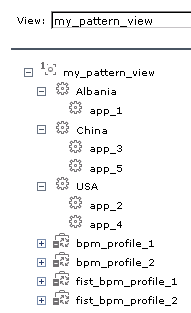
Each country name (Albania, China, USA) in the above example is a Virtual Container node type. Virtual Container nodes are not CIs; they are not part of the IT universe model in the CMDB, and they have no properties of their own. They function simply as an organizational container in the view for the defined groupings.
The icon displayed for a Virtual Container node is the icon used for the CIs organized by the Virtual Container. So for the countries grouping, the Virtual Container nodes display the Application CI icon.

Different Grouping Definitions for Topology and Tree Presentations
Grouping options can apply for the overall view, or different grouping options can be defined to apply for the topology presentations and tree presentations of the view. To define different grouping options for topology and tree presentations, you select the Use different folding/grouping definitions option in the view properties. For details, see Using the Different Folding/Grouping Definitions Option.
In the following example, all nodes are grouped by attribute Country in the tree presentation for the view, and by CIT in the topology presentation for the view.

When different grouping is used for the tree and topology presentations, there may not be correlation between the presentations, so that an item in the tree presentation does not have a corresponding item in the topology presentation, or vice versa.