Administration > CMDB Administration > View Manager Administration > Working with View Manager > Presentation Options for Views > Folding Options
Folding Options
Folding refers to how related CIs are displayed in the Mercury Business Availability Center views. When folding is used, the CIs are displayed on different levels; when folding is not used, the CIs are shown on the same level. For example, for a parent-child relationship between CIs with folding, the child CI is shown on a hierarchical level below the parent.
The default folding settings works differently for the tree and topology presentations of the view, as described in the following sections. In addition, folding rules can be defined that change the organizational structure for the presentation layer of the view, as described in Using Folding Rules (Pattern Views Only).
Tree Presentation
The tree presentation for a view (as seen, for example, in View Explorer and in the Dashboard Console) always shows the CIs with folding, for both pattern and instance views, regardless of what folding options are set for the view.
The folding is determined by the hierarchical structure defined for the CIs in the view. You move down through the levels to see the CIs on each lower branch.
In the following picture, both panes show the view in tree presentation, using folding.

Topology Presentation
The use of folding in the topology presentation for a view (as seen in the IT Universe Manager Topology Map and Dashboard Topology Map) depends on whether the Use different folding/grouping definitions option is selected for the view in the view properties. (For information on this option, see Using the Different Folding/Grouping Definitions Option.)
The Use different folding/grouping definitions option influences topology presentation for both pattern and instance views as follows:
- By default, the topology presentation for a view does not use folding. Therefore, if the Use different folding/grouping definitions option is selected (meaning that the tree and topology presentations each use their own settings), the topology map uses its default setting of no folding, and the CIs are shown on one level. The CIs are connected by extended arrows, representing the relationships between them.
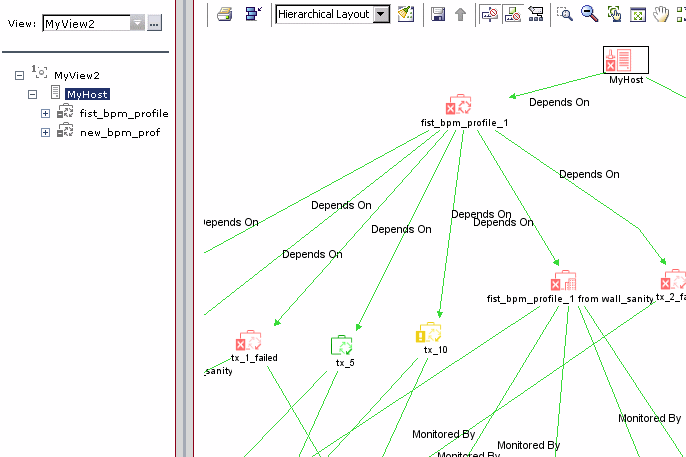
- If the Use different folding/grouping definitions option is not selected for the view, the topology presentation uses the same folding definitions as the tree presentation, so folding is used. If an icon is displayed with a shadow
 in the topology map, it means that there is an additional CI layer beneath it, and you drill down to see the underlying layer of CIs.


Using Folding Rules (Pattern Views Only)
You can define folding rules for a pattern view when creating or editing the TQL for the view, as described in Adding Organization (Folding) Rules to Relationships. The folding rules are defined per relationship in the view.
If the view is set to use different folding definitions for the topology and tree presentations, then you can define different folding rules for each presentation. For more information on using this option, see Using the Different Folding/Grouping Definitions Option.
The Right Sibling and Left Sibling folding rules have no effect on the tree or topology presentations of the view.
The Parent and Child folding rules override the general folding definitions for the relationship and, in some cases, may change the organizational structure for the topology and/or tree presentation in IT Universe Manager and Dashboard.
The Parent/Child folding rules influence the view as follows:
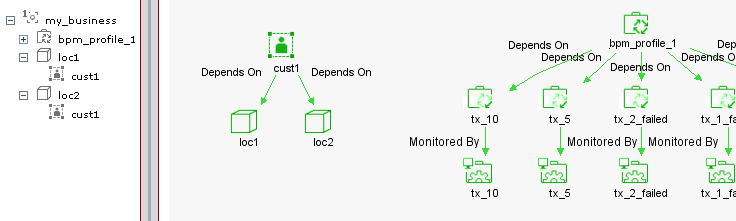
- If you define a Parent or Child rule on a relationship for the topology presentation (when using different folding definitions, so the CIs are shown by default on one level)—then the display of the CIs for that relationship changes, so that they are shown with folding. In the following example, a Parent rule is defined for the relationship between cust1 and its child CIs.

- If you define a Parent rule on a relationship, when the CIs are shown with folding, the rule has no effect on the display of the CIs in the topology or tree presentations.
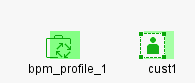
- If you define a Child rule on a relationship, the hierarchical order is changed, so that the child CIs are displayed above the parent. This can be applied to both the topology and tree presentations, or applied to only one of them if you are using different folding definitions.
Note: The Child rule only affects presentation, not the dependency relationship between the parent and child CIs—the parent CI still takes status from the child CIs.
In the following example, a Child rule is defined in the topology presentation for the view, on the relationship between Customer and Location CIs. In the topology map, the hierarchy is reversed, so that child CIs loc1 and loc2 are shown with drill down to the parent CI, cust1. The tree for the view (with no Child rule) is unchanged.
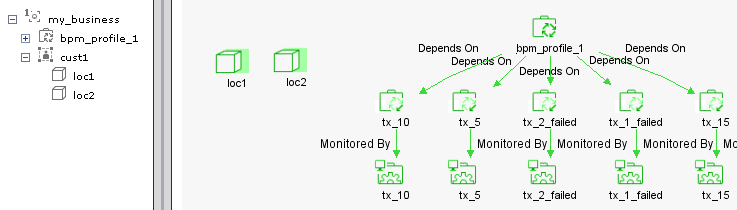
In the following example, a Child rule is defined in the tree presentation for the view, on the relationship between Customer and Location CIs. In the tree, the hierarchy is reversed, so that child CIs loc1 and loc2 are shown above the parent CI, cust1. The topology map (with no Child rule) shows the cust1 CI as the parent, and without folding.