 Applications > Using Dashboard > Mercury Dashboard Ticker > Ticker Window
Ticker Window
The Ticker Window displays a scrolling list (from right to left) of the top level CIs monitored by Dashboard along with icons that display the status of each one of the CI's KPIs.
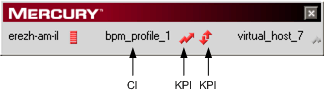
The icons correspond to the icons displayed in the Top View tab in Dashboard. For details, see Working with the Top View Tab.
You set the scrolling speed of Mercury Dashboard Ticker in the Preferences page. For details, see Modifying Preferences.
When you have moved the Ticker Window to a specific location on your desktop, the window will be displayed in the same location the next time you select Show Ticker in the Preferences page or when you restart your computer.
If you move the mouse to the Ticker Window, scrolling stops; it resumes when you move the mouse out of the Ticker Window.
You can click an icon in the Ticker Window to show a tooltip that includes the name of the KPI.

If you change any parameter in the Preferences page, scrolling restarts from the beginning.