Applications > Using Dashboard > Mercury Dashboard Ticker > Message Window
Message Window
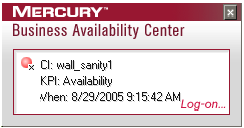
The Message Window is used to convey to the user that a KPI's status has changed to error/poor/worst.
The window is displayed either automatically or manually. For details on how to set this option, see Modifying Preferences.
When you close the message window, the entry that was displayed is removed from the queue. You cannot re-display that information. When you reopen the window, the next message in the queue is displayed.
If you specified in the Preferences that an alarm should be sounded when a KPI's status changes to error/poor/worst, an alarm sounds when the message is displayed.
The Message Window displays the following information: