 Applications > Using Dashboard > Dashboard Reports > Change Report > Viewing the Change History for a CI
Viewing the Change History for a CI
You can view the change history of a specific CI.
Note: To display the Change History report, make sure that the popups are not blocked in your browser.
A typical Change History report is as follows:
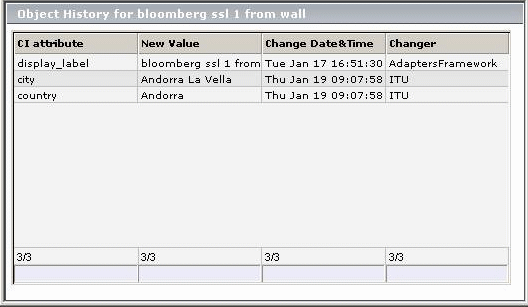
The page displays the following information:
|
Item
|
Description
|
|
CI Attribute
|
The name of the CI attribute that was updated.
|
|
New Value
|
The new value of the CI attribute.
|
|
Change Date & Time
|
The date and time when the update was performed.
|
|
Changer
|
The name of the user that manually modified the CI's property, or the name of the discovery probe that automatically discovered a change made to the CI's property.
|
For details about the report's functionality, see Working with Applications.
To view the change history for a CI:
- Right-click a changed CI and select Goto Report > Change Report to open the Change Report page.
- Click the History icon
 for the required CI to open the History page.