 Administration > CMDB Administration > IT Universe Manager Administration > Configuration Item Properties > General Properties for CIs > Editing the Menu List
Editing the Menu List
You can define one or more context menus for a CI or modify the menu list. The menus are displayed for the CI in Dashboard.
When defining menus, you should make sure that the selected menus are logical for the CI.
For information on context menu content, see Context Menu Items Repository in Application Administration.
To edit the context menu list for a CI:
- Open the IT Universe Manager Properties tab for the CI and click Edit Menu List (to the right of the Context Menu box).
- In the displayed Select Context Menus window, select the required menu(s) in the Available Menus area (you can select more than one using Ctrl and Shift) and click the right arrow to move them to the Selected Menus area.
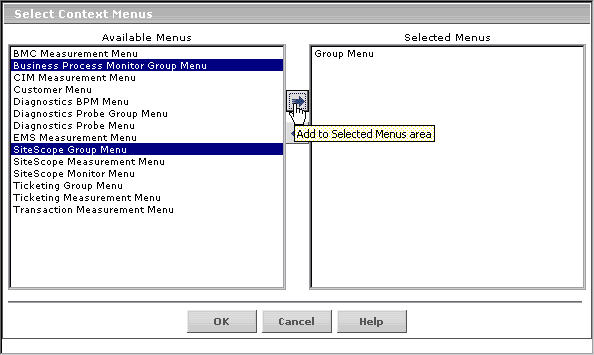
- To remove menus from the menu list for the CI, select them in the Selected Menus box and click the left arrow.
- Click OK. The selected menus are displayed in the Context Menus box on the Properties tab.

Note: You must click Apply in the Properties tab for the menu changes to be saved.