 Administration > CMDB Administration > IT Universe Manager Administration > Working with CIs in IT Universe Manager > Working with Relationships > Deleting a Relationship
Deleting a Relationship
You can permanently remove the relationship created between two CIs. This will not remove either of the related CIs from the CMDB, but will remove the relationship between the two CIs from the CMDB and all views.
To delete relationships from the CMDB:
- In the IT Universe Manager tab, select the CI in View Explorer for which you want to delete a relationship.
- In the Related Configuration Items tab in the right pane, select one or more check boxes for the relationships that you want to delete.
- Click Delete Relationship.
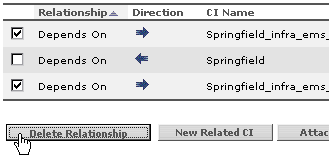
- Click OK in the confirmation dialog box. The relationship(s) are removed from the list in the Related Configuration Items tab and from the CMDB.
Notes and Limitations for Deleting a Relationship
- The relationship table shows only the relationships for the CI that are part of the current view; however, the same relationships may also be part of other views, so the relationships will also be deleted from those views.
- Deleting a relationship does not remove from the view CIs that were added within that view. If, after deleting a relationship, the CI is no longer related to any other CI in the view, then the CI is shown at the top level of the view. To remove the CI completely from the view (without deleting it from the CMDB), use the Disconnect from Parent CI option in the Instance View Editor (as described in Disconnect CI from Parent).
- When you delete a relationship that was created by the source adapters or the discovery process, the relationship will be restored the next time that the CMDB is updated by that source (if the relationship is still valid), and will reappear in all relevant pattern views.
- It may take a few minutes to delete subtrees, or multiple CIs and relationships, from a view.