 Deployment > Deploying Servers > Deployment Configuration > Deployment Configuration > Eight Machine Deployment
Eight Machine Deployment
An eight machine deployment is the same as an enterprise deployment, with the addition of extra backup machines for the Core and Centers Servers as well as one extra backup machine for both the Modeling and Online Data Processing Servers. Optional, additional Offline Data Processing Servers can be included for internal load balancing only. For details on the enterprise deployment, see Five Machine (Enterprise) Deployment.
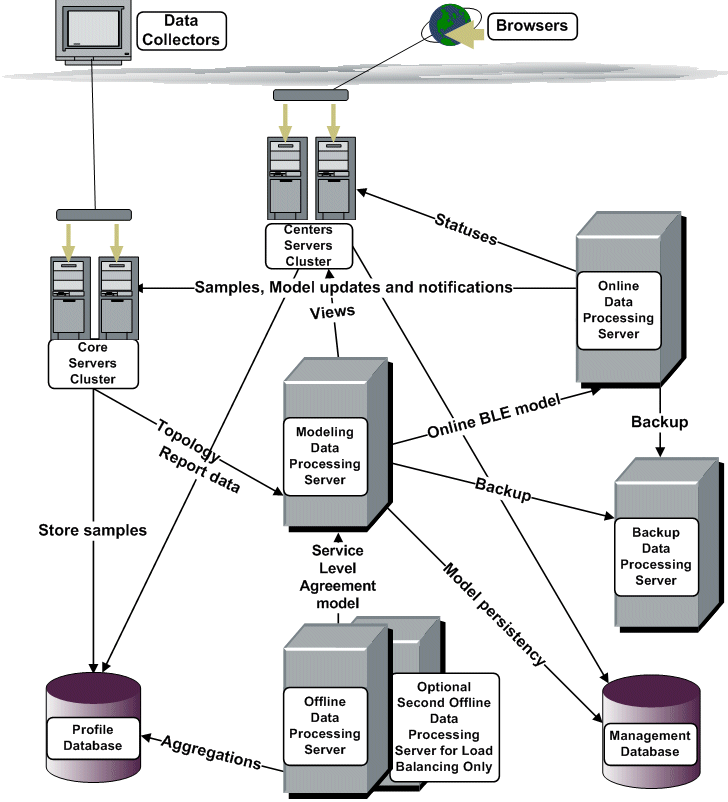
By having a backup server for the Core, Centers, Online Data Processing, and Modeling Data Processing servers, and an optional, additional Offline Data Processing Server, you achieve load balancing for the Centers, Core, and Offline Data Processing servers, and high availability for the Core, Centers, Online Data Processing and Modeling Data Processing servers (high availability for the Offline Data Processing Server is also achieved, providing the CMDB directory has been reassigned for high availability. For details, see High Availability for the CMDB Directory). For details on load balancing, see Load Balancing for Mercury Business Availability Center. For details on high availability, see High Availability for Mercury Business Availability Center.
To carry out an eight machine deployment, you choose the Custom setup type during Mercury Business Availability Center installation and specify the server type you want to install on each machine. For the Data Processing Servers, you further specify which type of Data Processing Server you want to install on each machine. For details on installing Mercury Business Availability Center, see Installing Mercury Business Availability Center Servers on a Windows Platform.