 Administration > Application Administration > Dashboard Administration > Configuring KPIs > Selectors for KPIs > Notes and Limitations
Notes and Limitations
- The sample type must be appropriate for the rule you selected for the KPI. For example, samples of type "ss_monitor_t" (SiteScope Measurement in the predefined sample type list) have no relevance for the Transaction Performance Rule defined for a Performance KPI.
- If you define only a sample type (either as part of a custom selector expression, or by selecting one of the predefined sample types) and do not define anything else for the filter, the KPI will receive all samples for that sample type category.
- You should define the selector parameters in the order Field->Operator->Value.
- When manually defining the properties for a custom selector with multiple blocks of selector expressions, every block must contain a sample type selector to identify the relevant data source, for example, sampleType == "trans_t" for a Business Process Monitor transaction. A different sample type can be defined for each expression block.
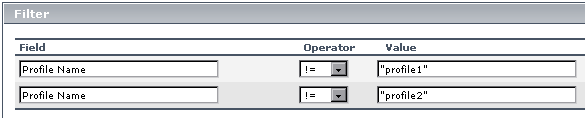
- Do not repeat the same key and operator combination within a logical expression block; otherwise, the KPI will not receive samples. For example, do not use the following combination:
When using metadata for a selector, only one sample type can be selected for the whole selector.
Instead of this format, use, for example, the notIn operator in place of !=. You can use this method to avoid almost any repeated key/operator scenario.
