 Administration > Application Administration > Service Level Management Administration > Downtime Events > Event Examples
Event Examples
This section provides examples of events for all scheduling periods, and contains the following topics:
Once
Every morning the VP of eBusiness looks through the previous day's SLAs Summary reports. One morning, she realizes that due to maintenance in the Springfield office, the Web applications server had been down for three hours and all Business Process Monitor CIs from that location have failed. She needs to define a retroactive downtime event and adjust the reports to reflect the downtime.
- She accesses the Events tab and creates a new Business Process Monitor event by clicking the New BPM Event button.
- She enters a name and description for the downtime. She leaves the Exclude data reported check box selected.

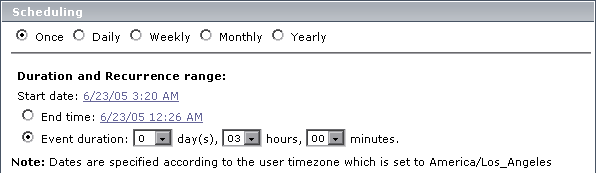
- In the Scheduling section, she chooses the Once option and enters the start date, time, and duration of the server downtime.
- In the Event Schedule Action section, she selects one of the SLAs that cover the Springfield office contracts (she must create an event for each SLA).

- She clicks CI Filter to select the SLA.
- She selects the relevant SLA and then clicks CI Filter to select the Springfield location.
- She saves the event.
- She recalculates the SLA over the relevant period of time.
- She next accesses the SLAs Summary page, generates reports for relevant KPIs, and verifies that during this time, the data is ignored and the status of the SLA is downtime.
Daily
The operations support engineer is told that a server's graphics card is being upgraded for a new map application. A slowdown of the server may be expected for three days beginning today, while the R&D team tests the new application. To minimize problems, the team will be running tests for one hour each day. All SLAs that monitor this server will be affected, and he should define an event to appear in reports to explain the slowdown.
- He defines a new SLA event, and enters a name and detailed description for the downtime (each SLA needs its own event). He clears the Exclude data reported check box.

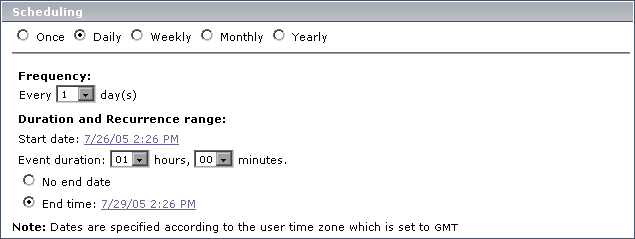
- In the Scheduling section, he chooses the Daily option and enters a frequency of 1 day (the default). In the Duration and Recurrence range, he chooses today's date and time from the calendar. He chooses a duration of 1 hour, and the end date and time for three days' hence.
- In the Event Schedule Action section, he selects the relevant SLA, clicks CI Filter, and selects the server.
- He saves the event.
- He accesses the CIs Over Time report (Applications > Service Level Management > Over Time Reports) and clicks the Advanced Options link. He selects the Downtime Event Description check box.
- The next day he generates a CIs Over Time report and verifies that the event appears in the report.
Note: The operations support engineer has no need to recalculate the SLA, since the Exclude data reported check box was not selected.
Weekly
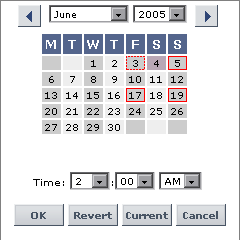
Example 1: You define an event to occur once every two weeks (2) with a start date of Tuesday, 7 Jun 05. For calculation purposes, the first week runs from Monday, 6 Jun 05 till Monday, 13 Jun 05.

- If the event is to occur every second Tuesday, the first occurrence of the event will be on Tuesday, 7 Jun 05.
- If the event is to occur every second Thursday, the first occurrence of the event will be on Thursday, 9 Jun 05.
- If the event is to occur every second Monday, the first occurrence of the event will be on Monday, 20 Jun 05.
Example 2: You define a recurring event that occurs every second week on a Friday and a Sunday, to begin on a Saturday. In the first week, the event will run only on Sunday. In the second week, the event does not run. In the third week, the event runs on Friday and on Sunday, and so forth.
Monthly
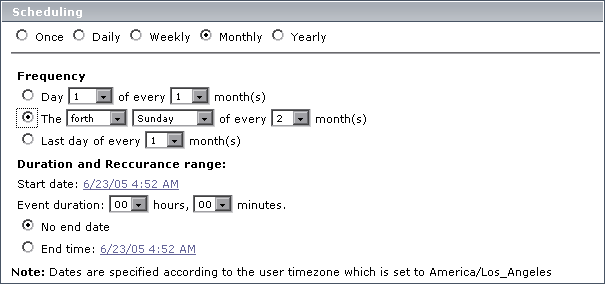
Every other month, on the forth Sunday, the Web server for the Finance department in the Unionville office is scheduled for maintenance at 1:00 AM for two hours. Therefore, the IT Ops director must define a recurring event and exclude all CIs from reports during this period.
- The IT Ops director accesses the Events tab and creates a new Business Process Monitor event by clicking the New BPM Event button.
- He enters a name and description for the maintenance. He leaves the Exclude data reported check box selected.

- In the Scheduling section, he chooses the Monthly option. In the Frequency section, he selects Fourth, Sunday, and 2. He enters the start date and time and enters 2 for the event duration. He leaves No end date selected.
- In the Event Schedule Action section, he selects one of the SLAs that cover the Unionville office contracts (each SLA needs its own event).

- He selects the SLA's CI from the CI filter, so that all descendants are also affected.
- He saves the event.
Yearly
The VP of eBusiness likes to be prepared. Each July 5th, her boss sends her an e-mail requesting network statistics for the previous day to compare to their targets. This year, on July 3rd, she prepares an SLA to measure network performance and creates an event that will run throughout the next 24 hours.
In the Scheduling section, she chooses the Yearly option. In the Frequency section, she selects Every, July, and 4. She enters the start date and time of July 4th at 12:00 AM and sets an event duration of 23 hours and 59 minutes. She leaves No end date selected.
On July 5th she is able to reply immediately to her boss's e-mail with the network performance results compared to the target objectives.