 Administration > Application Administration > Repositories Administration > Context Menu Items Repository > Context Menu Items Details > Delete CI
Delete CI
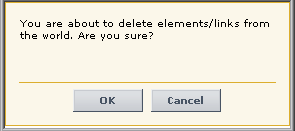
Opens the following dialog box to confirm that you want to delete the relevant CI in IT Universe Manager - for details, see Working with CIs in IT Universe Manager in IT Universe Administration.
Pre-Processor Class
The context menu item pre-processor class is ITU internal (open modal window) - for a description of the class, see Pre-Processor Classes.
The parameters are:
URL - the URL of the new window.
Post-Processor Class
The context menu item post-processor class is ITU internal (open modal window) - for a description of the class, see Post-Processor Classes.
The parameters are:
SCROLL - if set to 1, a scrolling tab is added to the opened window, if required. If set to 0, no scrolling tab is added to the open window.
HEIGHT - the opened window height, in pixels
PERMISSION_TYPE - internal. This parameter must not be modified.
WIDTH - the opened window width, in pixels
RESIZE - if set to 1, the window can be resized. If set to 0, the window cannot be resized.