 Administration > Application Administration > Dashboard Administration > Configuring CI Status Alerts > Viewing the Alerts
Viewing the Alerts
After you complete defining an alert scheme, it is listed in the CI Status Alerts tab.
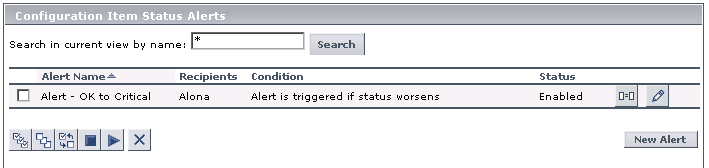
The Configuration Item Status Alerts page displays the following information:
You can perform the following actions:
- You can attach a new alert scheme to a CI. For details, see Creating an Alert Scheme and Attaching it to a CI.
- You can duplicate and edit an existing alert scheme. For details, see Administering Alert Schemes.
- You can delete an existing alert scheme. For details, see Administering Alert Schemes.
- You can enable or disable an alert scheme. For details, see Administering Alert Schemes.
Note: To make your selections, you can also use the buttons at the bottom of the page for, Select All, Clear All, and Invert Selection
 .