 Administration > Application Administration > Dashboard Administration > Configuring KPIs > KPI Objectives > Excluding Statuses
Excluding Statuses
Not all the statuses need be used for a KPI; for example, the OT Impact KPI by default uses only OK (green) and Critical (red) status. There are two methods used in Dashboard to exclude statuses, as described in the following sections.
Blank Objective Value
When the objective value for a status is left blank, Dashboard ignores that status during KPI status calculation. For example, the Performance KPI for a transaction may have the following objectives defined (taken from the threshold settings for the transaction in Monitor Administration):
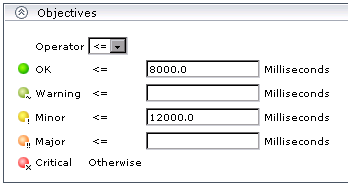
In this case, if the measurement for the KPI does not fall into the OK objective level, then Warning is skipped and the measurement is evaluated against the Minor objective level. If it does not fall into that level, Major is also skipped, and the KPI is given Critical status.
If you want to exclude statuses when editing the objective values for a KPI, it is recommended that you use this method.
Repeated Objective Value
Dashboard allocates status by starting at OK status, and evaluating the KPI measurement against each objective level until the right level is found. When an objective value is repeated for two or more statuses, the repeat occurrences are passed over and those statuses are not used.
For example, the Availability KPI for a RUM page monitor may have the following objectives defined (by using the Availability threshold setting in Monitor Administration for all four defined objective values):

In this case, if the measurement for the KPI is greater or equal to 98%, then it is given OK status. If it is less than 98%, then evaluation against the Warning, Minor, and Major statuses will also not give any result and these statuses will not be used; the KPI will then be given Critical status.