 Administration > Application Administration > Dashboard Administration > Configuring KPIs > Real-Time Monitoring of CI Property Changes
Real-Time Monitoring of CI Property Changes
For a limited number of CIs, Dashboard can monitor for changes to the CI properties (or changes to the properties of the CI's child CIs) in real-time.
This information is in addition to the Dashboard Change Report, which shows a historical report on changes to properties for CIs over a period of time. (For details on the Change Report, see Change Report in Using Dashboard.)
In order to display real-time changes for a CI and its children, the Monitor changes check box must be selected for that CI in the KPIs tab.
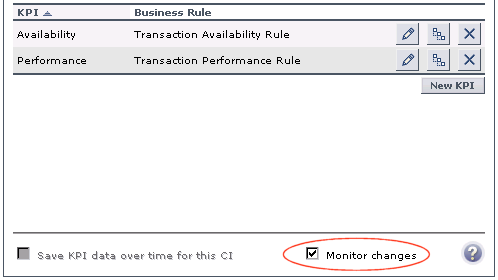
Note: The Monitor changes option is only enabled if:
You can set the monitor changes option for up to 20 CIs. Once 20 CIs have been configured, a message is displayed when you try to set the option for another CI, stating that the limit has been reached.
If you then deselect the option for one or more of the configured CIs, the option becomes available again for all CIs, until the 20 CIs limit is again reached.
Note: To change the 20 limit, select Admin > Platform > Setup and Maintenance > Infrastructure Settings, click Applications, select Dashboard Application, and locate the Maximum monitored CIs entry in the Change Impact Properties table. Modify the value as required. However, change this value with caution to avoid too much load on the system.
When the monitor changes option has been set for a CI, Dashboard continuously monitors that CI and all its child CIs, to see if a change occurs in one of the significant properties defined for the CIs.
The significant properties vary for each CIT, according to the CIT definition in Admin > CMDB > CI Type Manager. In CI Type Manager, in the Attributes tab for the CIT, the Change Monitored column must be selected for a property, in order for that property to be significant and therefore monitored. For more information on CIT definitions, see Managing CITs in CI Type Manager Administration.
If a change occurs in one of the significant properties for the CI or the CI children, then an icon is displayed in Dashboard beside the CI name. For more information, see Viewing Real-Time Changes to CI Properties in Using Dashboard.
After a change occurs, the change icon is displayed for 24 hours (default value). You can change the default value, as described in Specifying the Changes Period for the Change Report.